SEO Audit Template: Download the Free Excel I Use in My Audits
Download the free SEO audit template in Excel that I use in my professional audits. It includes technical, on-page, content, performance and off-page tabs with automatic formulas to calculate the score for each area.
Published on · Updated on · 9 min read
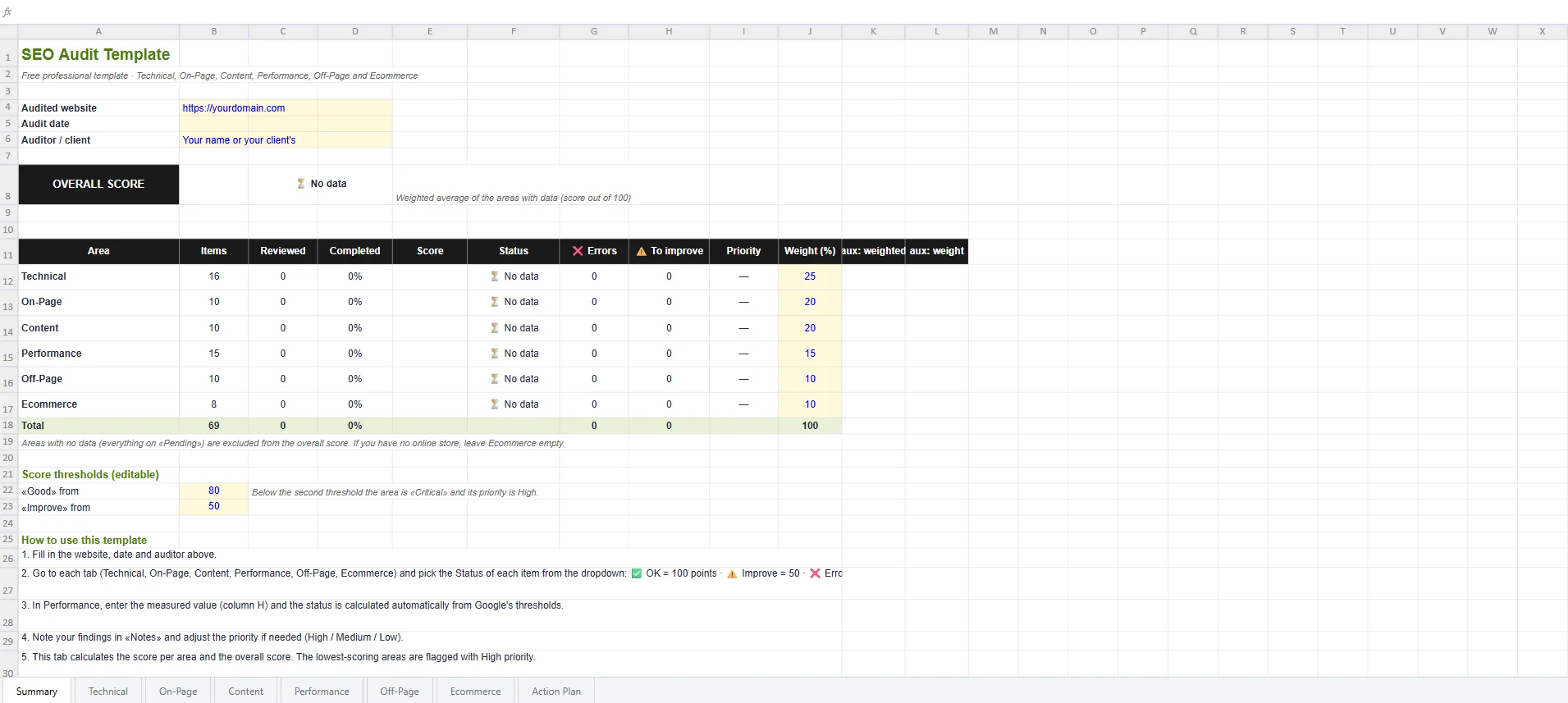
Looking for an SEO audit template to download and use right away? Here’s the same Excel structure I apply in my audits: technical, on-page, content, performance and off-page tabs, with formulas that calculate the average score and color the statuses (✅/⚠️/❌) automatically.
If you’re starting from scratch, begin with what SEO is and how it works and the guide to a complete SEO audit in 7 steps. If you already know what you’re doing, download the template and jump straight to the usage section.
Download the SEO audit template in Excel
I’ve prepared two versions of the same file: one in Spanish and one in English. They’re identical in structure and formulas; only the text changes. Download the one you need.
Direct access to the template (no sign-up, no email, no tricks):
In my audits, this template saves me the heaviest part: making sure I don’t forget anything. The structure is the same one I use with clients in renovations, training and ecommerce, and it lets me deliver a report with clear priorities in less time.
How to use the template for your project
The template is designed to adapt to any type of audit. These are the four most common ways to use it. Choose the one that best fits your project.
Option 1: Google Sheets (with automatic formulas)
Perfect if you prefer working in the cloud and want the calculations to happen on their own. You can import the .xlsx file directly into Google Sheets.
| Tab | What it contains | Key formulas |
|---|---|---|
| Summary | Area, average score, status (✅/⚠️/❌) and priority (high/medium/low) | =AVERAGE() to calculate scores. =IF() to change colors based on the grade. |
| Technical | Element, status, notes, priority | =COUNTIF() to count how many elements are OK. |
| On-Page | Element, status, notes, priority | Data validation for statuses and priorities. |
| Content | Element, status, notes, priority | =VLOOKUP() to look up data across tabs. |
| Performance | Element, status, notes, priority | Radar chart at the end to visualize scores. |
| Off-Page | Element, status, notes, priority | Conditional formatting to color cells automatically. |
Option 2: Notion (content-focused)
Ideal if you work with content and want a quick, collaborative overview. Copy the Excel structure into a Notion database.
| Block/Section | What it includes | How it’s organized |
|---|---|---|
| Executive summary | Overall score, main issues, priority recommendations | All on a main page with clear formatting. |
| Technical checklist | robots.txt, sitemap, HTTPS, canonicals… each with status (✅/⚠️/❌) | Checklist blocks with checkboxes and emojis. |
| On-Page database | URL, Title, Meta, H1, H2, Keywords and Notes | Table where each row is a different page. |
| Content notes | Quality, freshness, search intent, duplicates | Text blocks with bullet points and dates. |
| Performance | LCP, INP, CLS with their status | Data pasted from PageSpeed Insights with visual status. |
Option 3: Complex ecommerce
For online store cases with many products and categories. The base template works as a starting point, but you should create additional tabs per category.
| Area | What to review | Priority action |
|---|---|---|
| Products | Unique titles with attributes (size, color), original descriptions, spec tables, product schema and reviews, images with alt | Create a control sheet per product category. |
| Categories | Unique introductory text, logical hierarchy, filters without duplicate URLs, internal links | Review main categories and subcategories. |
| Cart & Checkout | Visible cart, checkout over HTTPS with few steps, clear payment methods, active SSL certificate | Simulate purchases to detect friction. |
Option 4: Purely technical approach (performance and loading)
Perfect if you want to go straight to the point and leave content for another time. Use the Technical and Performance tabs of the template.
| Metric | Recommended value | Tool |
|---|---|---|
| LCP | < 2.5 seconds | PageSpeed Insights / CrUX |
| INP | < 200 milliseconds | PageSpeed Insights / CrUX |
| CLS | < 0.1 | PageSpeed Insights / CrUX |
| FCP | < 1.8 seconds | PageSpeed Insights |
| TTI | < 3.8 seconds | PageSpeed Insights |
| Page size | < 3 MB | PageSpeed Insights |
| Requests | < 50 | PageSpeed Insights |
Technical checklist:
| Element | Status | Notes |
|---|---|---|
| Server: HTTP/2 or HTTP/3 and TTFB < 200ms | ✅/⚠️/❌ | — |
| Cache configured correctly | ✅/⚠️/❌ | — |
| Images in WebP/AVIF with lazy loading | ✅/⚠️/❌ | — |
| Minified CSS and inline critical CSS | ✅/⚠️/❌ | — |
| Minified, async or deferred JS | ✅/⚠️/❌ | — |
| Fonts with font-display: swap and in WOFF2 | ✅/⚠️/❌ | — |
| CDN for static content | ✅/⚠️/❌ | — |
| Hosting adequate for the traffic | ✅/⚠️/❌ | — |
What the template includes (and why it works)
Before adapting it to formats or niches, you need the mother structure. This is what you get in the Excel.
1. Technical Audit: the foundation
Start with the basics. If the site isn’t crawlable and indexable, everything else fails. The template includes the checks I always do in this phase.
- robots.txt: does it exist? Does it block important content by mistake? Check it with Google Search Console. Here you have how to create robots.txt and XML sitemap correctly.
- XML Sitemap: is it up to date and submitted to Google Search Console?
- Status codes: look for misconfigured 404, 301 or 302 errors. Here you have how HTTP codes and web errors work.
-
Canonicals: every page should have its correct
rel="canonical"and without conflicts. - HTTPS: the whole site should be secure. If there’s mixed content (HTTP and HTTPS), fix it.
- URL structure: they should be clean, use hyphens and be descriptive. No weird parameters.
- Structured data: check that Schema (FAQ, Article, Product, etc.) is implemented and validate with Google’s tool. Here you have a list of useful schemas and how to check that your schema works.
2. On-Page Audit: the content
Here we evaluate each key page and its optimization for search engines. The template includes a row per page with the fields that matter.
- Title Tag: it should be unique, attractive, contain the main keyword and be between 50-60 characters. Here you have how to optimize the meta title and meta description.
- Meta Description: unique, persuasive and 120-160 characters. It doesn’t directly influence ranking, but it improves CTR.
- Headings (H1-H6): there should be a single H1 per page. The hierarchy (H2, H3…) should be logical and semantic. Here you have the H1, H2 and H3 hierarchy guide.
- Content: it has to be useful, original, resolve search intent and have an adequate length. No thin or duplicate content.
- Keywords: they should appear naturally, without stuffing. Use synonyms and semantically related terms (LSI). Review how to choose keywords wisely.
- Internal links: the structure should be logical. Anchor texts should be descriptive.
- Images: all should have descriptive alt attributes. The file name also helps.
3. Performance and User Experience (UX)
Google rewards sites that offer a good experience. This is what the performance tab includes.
- Core Web Vitals: the LCP (loading), INP (interactivity) and CLS (visual stability) metrics must meet Google’s thresholds. Here you have how to improve your Core Web Vitals.
- Loading speed: the page should load fast on mobile and desktop. Use PageSpeed Insights to measure it.
- Mobile responsiveness: the site should look and work well on all devices.
- Usability: navigation should be intuitive. Buttons and CTAs should be where the user expects them.
My advice after auditing more than 40 projects: don’t fill in the template all at once. Go tab by tab, mark statuses and leave notes for the end. The temptation to fill everything in one afternoon always ends in a weak report.
Frequently asked questions about the template and SEO audits
Is the template really free?
Yes. No sign-up, no email, no trick. You download the .xlsx directly and use it in your projects, whether for your own site or your clients’.
Can I use the template in Google Sheets or Notion?
Yes. The file is a standard .xlsx: you can import it directly into Google Sheets. If you prefer Notion, copy the tab structure into a database. What matters is the method, not the tool.
What’s the difference between an SEO audit and a maintenance checklist?
An audit is an exhaustive analysis done on a one-off basis (every 3-6 months). The maintenance checklist is lighter and reviewed more frequently (weekly or monthly). The template you download is designed for the full audit.
How often should I do an SEO audit?
It depends on the project, but a complete audit every 3-6 months is a good starting point. For large sites or highly competitive sectors, it can be monthly.
If you’d rather have a specialist audit your site with this same template, I review your project with the criteria I apply in my professional audits and deliver a clear report with a prioritized action plan. Tell me about your project and I’ll reply in less than 48 hours.

Download the template and audit your site today
You have the template, the structure and the guide. If you’d rather I do it for you, I’m here for that too.