On-Page SEO: a practical guide to optimize every page of your website
On-Page SEO is the foundation of any ranking strategy. In this guide I explain the 8 essential elements to optimize every page: title, meta description, headings, URLs, content, linking, images and Core Web Vitals.
Published · Updated · 10 min read
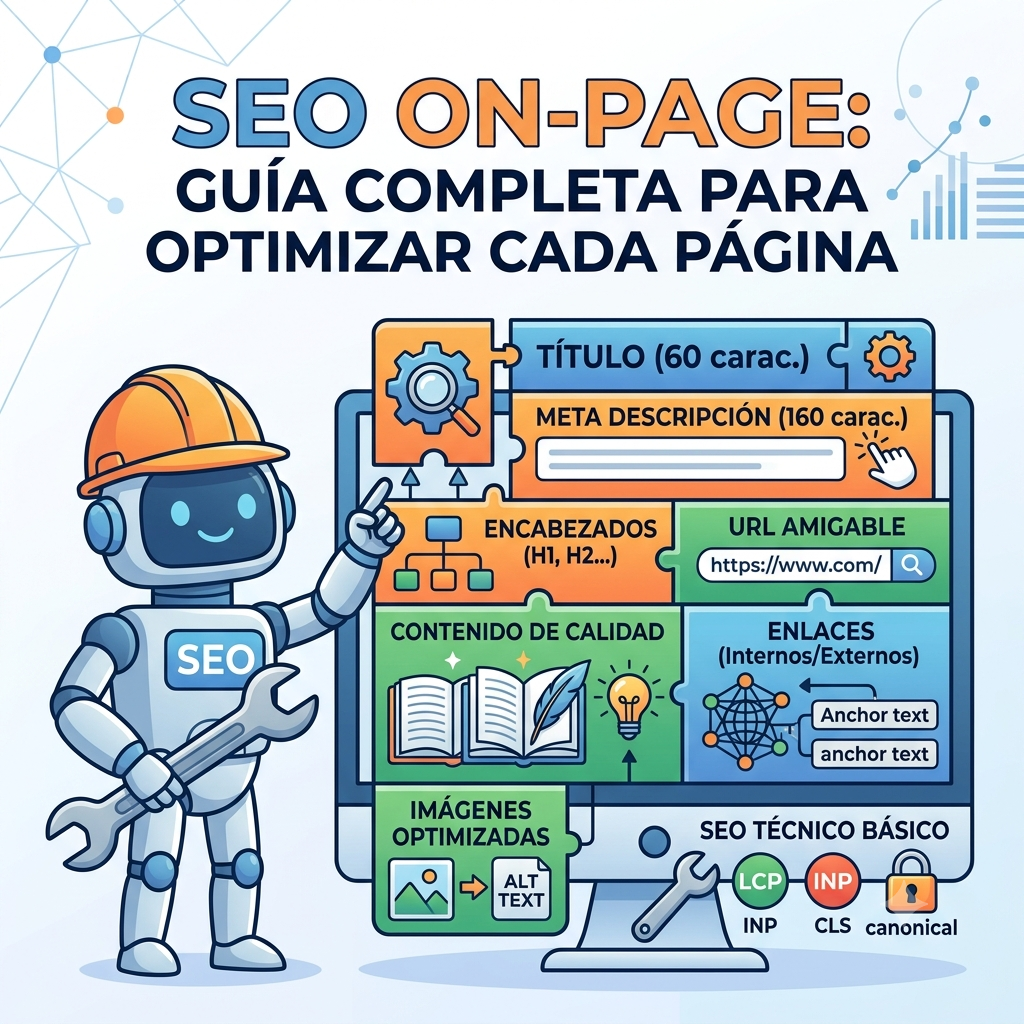
On-Page SEO is the foundation of any ranking strategy. It covers all the optimizations you make within your own website to tell Google what your content is about and why it deserves to be in the top positions.
Unlike Off-Page SEO, here you have full control: you don’t need anyone to link to you and it doesn’t depend on advertising budgets. If you’re starting from scratch, I recommend beginning with what SEO is and how it works.
The 8 essential elements of On-Page SEO
1. Title Tag
It’s the most important individual On-Page factor. It appears as the blue link on Google and in the browser tab.
- Length: between 50 and 60 characters (maximum 580 pixels).
- Keyword: place it as close to the beginning as possible.
- Click-through: use value terms (Guide, Case study, Step by step).
| Example | Title |
|---|---|
| ❌ Bad | SEO Services – Alex Figueiras |
| ✅ Good | SEO Services for SMEs | Freelance Consultant |
If you want to dive deeper, I have a dedicated guide on how to optimize meta title and meta description.
2. Meta Description
It’s not a direct ranking factor, but it determines the click-through rate (CTR). A higher CTR translates into more visits and better positions.
- Length: between 140 and 160 characters.
- Call to action: include verbs like discover, learn, optimize.
- Keyword: Google will highlight it in bold when it matches the user’s search.
| Example | Meta description |
|---|---|
| ❌ Bad | We offer SEO services for all types of businesses. |
| ✅ Good | Learn how to rank your website on Google. Discover the keys to On-Page SEO and attract customers to your business. |
Tip: if you want to improve your CTR on Google, I have a specific article on how to improve CTR.
3. Heading Structure (H1, H2, H3)
Structure the reading for the user and help the algorithm process the relevance of each section.
- Single H1: there should only be one per page, and it should include the main keyword.
- Strict hierarchy: don’t skip levels (e.g., going from H1 straight to H3).
- Secondary keywords: distribute them in H2 and H3 naturally.
I explain it with examples in the H1, H2 and H3 hierarchy guide.
4. Friendly URLs
The link structure should clearly indicate what’s inside the page, without beating around the bush.
- Use hyphens (-) to separate words. Never use underscores (_) or special characters.
- Keep the URL short and remove filler words (the, for, with).
| Example | URL |
|---|---|
| ❌ Bad | /index.php?id=1234&cat=5 |
| ✅ Good | /blog/on-page-seo-complete-guide |
5. Content and Search Intent
Content should answer exactly what the user is looking for, without unnecessary detours.
- Density: avoid keyword stuffing (artificial repetition). Use synonyms and related terms.
- Scannability: short paragraphs of 2 or 3 lines, bullet points and bold text to highlight key concepts.
If you want to master the writing side, check out SEO copywriting vs standard writing and learn how to choose keywords correctly.
6. Linking Architecture (Internal and External)
Links transfer authority and guide Google’s spiders through your site.
- Internal links: distribute page rank across your articles and reduce bounce rate.
- Anchor text: use descriptive text («technical SEO guide»), never empty phrases like «click here».
- External links: cite official or reputable sources to back up your claims.
7. Image Optimization
Unoptimized images are the main cause of slow websites. In my audits, almost 70% of websites with LCP issues have them because of poorly served images: outdated formats, no compression or no lazy loading.
- Modern formats: use .webp or .avif instead of heavy .png or .jpg.
- ALT text: briefly describe the image content for accessibility and indexing.
- File name: name the file before uploading it (on-page-seo-schema.webp, not IMG_9823.webp).
8. Performance and Core Web Vitals
A slow site drives the user away before they even read the first line.
LCP · Largest Contentful Paint
Loading of the main element in under 2.5 seconds. I explain it in detail in how to improve LCP.
INP · Interaction to Next Paint
Interaction response time under 200 ms. Details in how to improve INP.
CLS · Cumulative Layout Shift
Visual stability with a score under 0.1. Here’s how to improve CLS.
Canonical tag: prevents duplicate content issues. If you want to dive deeper into the technical crawling side, check out how to create a robots.txt and sitemap.
All of this is part of the Core Web Vitals Google uses as a user experience signal. If your website runs on WordPress and you notice it’s getting slower, check out why your WordPress is slow and how to speed it up.
Real experience: in a recent audit of an ecommerce with over 800 product pages, the main issue wasn’t content: it was that each product page loaded 3 external Google Fonts and 12 plugin script requests. By unifying the fonts and deferring non-critical scripts, LCP dropped from 4.2s to 2.1s on mobile. The performance side is usually the one you notice fastest when you handle it well.
Tools to audit your On-Page SEO
To analyze these factors in seconds directly from your browser:
Alex Figueiras TOOLS
Suite of free utilities designed specifically for SEO agencies and consultants.
See tools →SEO HUB
Chrome extension to audit metadata, headings and Core Web Vitals in real time.
GoSEO / SEO Pro
Lightweight extensions to verify data structure and keyword density.
See more tools →Remember: On-Page SEO is ongoing work. Audit, adjust and measure again. If you want to validate your website’s structured data, check out how to check that Schema is working.
Need help with your On-Page SEO?
If you want to optimize every page of your website and don’t know where to start, let’s talk.