Core Web Vitals: what they are and how to improve LCP, INP and CLS
If your website fails these three metrics, you’re giving away Google rankings and losing customers. I explain what each one measures and how to improve them without going crazy.
Published · Updated · 11 min read
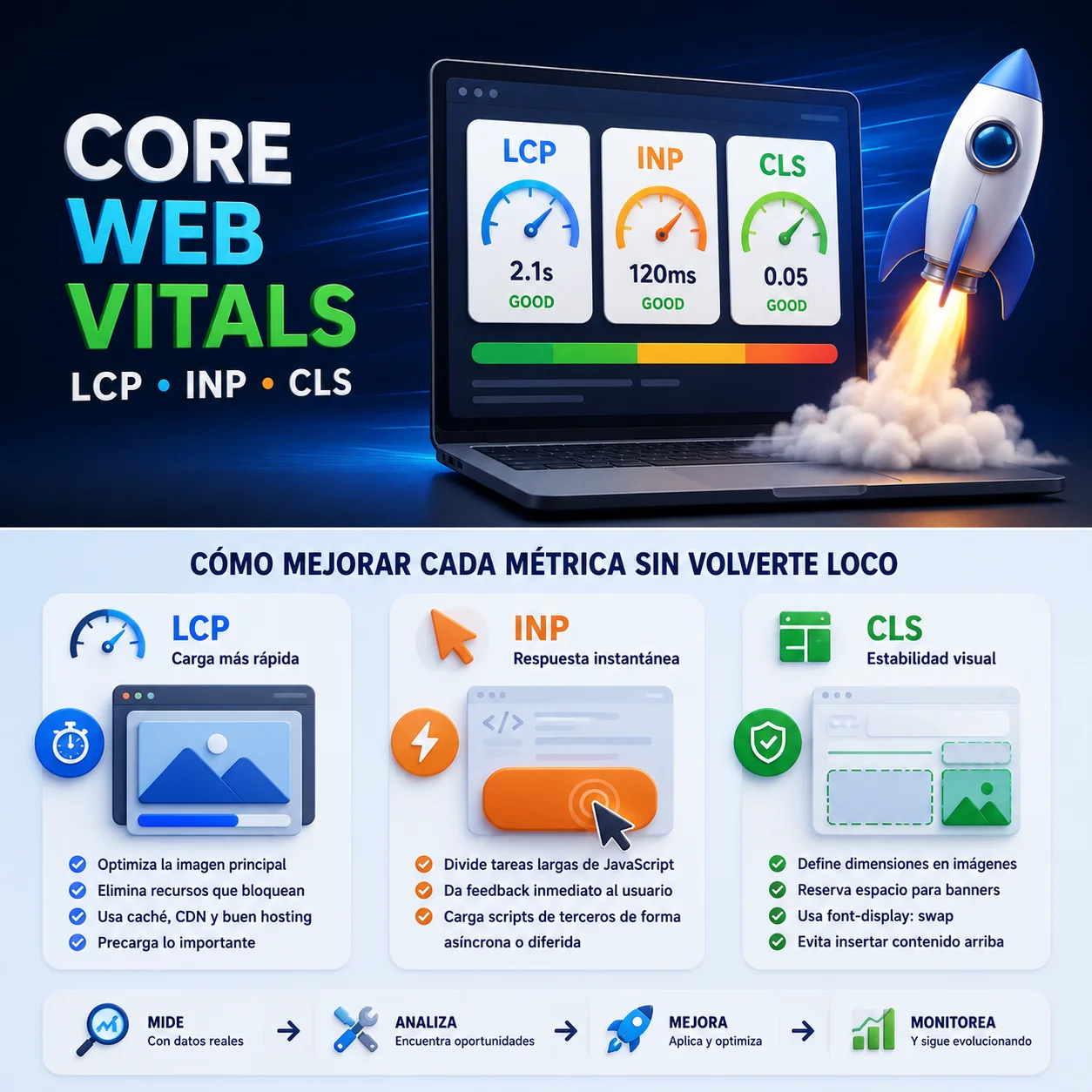
Let’s be honest. When we talk about Core Web Vitals, many people think it’s one of those technical nerdy things that only Google geeks care about. And I get it. But let me tell you something: if your website doesn’t meet these metrics, you’re giving away Google rankings and, worse, you’re losing customers.
And no, it’s not an exaggeration. That’s the reality in 2026.
I’ll tell you straight, as if we were having a coffee. Because in the end, SEO isn’t magic — it’s about understanding what Google wants and what your user needs. And now, with AI fully integrated into search, this matters more than ever. If you want the full context, start with what SEO is and how it works.
So what the hell are Core Web Vitals (and why you should care)
Imagine walking into a physical store. The doors open quickly, the aisles are clear and you can move around without anyone pushing you. That’s exactly what Core Web Vitals measure: the user experience on your website.
Google, in its drive to provide the best possible answer (whether on its classic search engine or the new AI Overviews), wants to make sure that when a user lands on your page, they don’t find a frustrating experience.
Since 2021, these metrics are an official ranking factor. They’re not the most important one, I’ll grant you that. But in a market where everyone competes for the same keywords, having impeccable Core Web Vitals can be the difference between being in first position or tenth.
The three metrics that will save your skin (or sink you)
Until recently, we talked about three metrics: LCP, FID and CLS. But in March 2024, Google said «this falls short» and replaced FID with INP. And that’s been a blow for many.
Let’s look at them one by one, without unnecessary jargon:
- LCP (Largest Contentful Paint): measures how long it takes for the largest element on your page to appear. The one the user sees as soon as they arrive. It can be a hero image, a video or a huge text block. Rule of thumb: under 2.5 seconds. If it takes longer, the user is already thinking about leaving.
- INP (Interaction to Next Paint): this is new and it’s where many websites are failing. It measures how quickly your page responds to user interactions. A click, a tap on the screen, typing in a form… The limit is 200 milliseconds. If it takes longer, the experience becomes heavy and frustrating.
- CLS (Cumulative Layout Shift): has this ever happened to you — you’re about to click a button and suddenly the page moves and you hit a banner? Well, that’s a bad CLS. It measures the visual stability of your page. The threshold is 0.1. The lower, the better.
| Metric | Measures | Good | Needs improvement | Poor |
|---|---|---|---|---|
| LCP | Loading | ≤ 2.5 s | 2.5 s – 4.0 s | > 4.0 s |
| INP | Interactivity | ≤ 200 ms | 200 ms – 500 ms | > 500 ms |
| CLS | Visual stability | ≤ 0.1 | 0.1 – 0.25 | > 0.25 |
How to improve each metric without going crazy
Right, you know what they are now. Here comes the good part: how to fix it. Because Google doesn’t just tell you there’s a problem — it gives you hints to fix it. Here’s what I do in my projects and what actually works.
Improving LCP: make your website fly
LCP is the one that hurts most and the one you notice most. If your website takes forever to load, goodbye visitors. Here’s what works:
Optimize the hero image to death. If your LCP element
is an image (which it usually is), pay attention to it. Use the
fetchpriority="high" attribute to tell the browser
«hey, this is the first thing I want you to load». And, of course,
use images in WebP or AVIF format, which weigh half as much as a JPG.
<!-- This is how you tell Google this is priority -->
<link rel="preload" as="image" href="/my-hero-image.webp" fetchpriority="high">
<img src="/my-hero-image.webp" alt="My image description" fetchpriority="high" width="1200" height="600">
Remove what’s unnecessary. CSS and JavaScript you don’t need to render the top of the page are blocking the load. Inline the critical CSS (what you need to render the top properly) and let the rest load later.
Hosting and CDN. Sounds like a cliché, but a slow hosting kills any optimization effort. If your server takes ages to respond, LCP goes out the window. Invest in good hosting and use a CDN so your content reaches anywhere in the world fast.
Navigation matters. If you have a site with many pages, the Speculation Rules API lets you preload the next page before the user clicks. It’s like having an assistant preparing the ground. LCP on those transitions can be almost instant.
Improving INP: make your website respond instantly
This is the one giving the most headaches. Because it means your JavaScript has to work well, and that’s not easy.
Divide and conquer. Long JavaScript tasks (those taking
more than 50 milliseconds) block the browser. If you have a heavy
process, divide the work into smaller parts. Use
scheduler.yield() to tell the browser «wait, attend to the
user, and I’ll keep going».
// This is how you split a heavy task to avoid blocking the UI
async function processLargeList(items) {
  for (const chunk of splitIntoChunks(items, 50)) {
    processChunk(chunk);
    await scheduler.yield(); // You let the browser breathe
  }
}
Careful with events. Don’t do heavy calculations inside
an onClick or onScroll. If the user clicks,
show visual feedback first (a spinner, a colour change) and then, when
the browser is free, run the heavy process. Your user will feel the
website responds fast, even if the process takes a bit longer.
Third-party scripts are the culprits. Google Analytics,
Facebook Pixel, ads… All of that eats resources. Load them
asynchronously or with defer so they don’t block user
interaction. And if you don’t need them, remove them. Less is more.
Improving CLS: goodbye to ghost movements
This is the easiest one to fix, but the most neglected.
Dimensions on images and videos. Golden rule: always set the width and height. That way the browser knows how much space the element will take up before it loads, and won’t have to rearrange the page later.
/* This is how you reserve the right space */
.my-image {
  aspect-ratio: 16 / 9;
  width: 100%;
}
Space for banners and ads. If you load advertising or
third-party content, reserve a minimum space with
min-height. That way when the ad loads, it won’t push the
rest of the content down.
Web fonts with care. Use
font-display: swap. That way while your custom font loads,
the browser shows a fallback font. The change is minimal and you avoid
the text shifting when the final font loads.
How to check your website
Don’t trust what you think. Measure with real data.
| Tool | What it gives you |
|---|---|
| Google Search Console | Specific Core Web Vitals report with real user data. Your first thermometer. |
| PageSpeed Insights | Detailed speed analysis with concrete improvement suggestions. Like having an SEO consultant next to you. |
| Chrome DevTools (Performance) | You see in detail what happens while your page loads. It’s the pro tool. |
If you also want a complete view of your website, see how to do a complete SEO audit in 7 steps and what free SEO tools in 2026 help you measure it.
AI also watches this and you should too
And here’s the key point: AI also values user experience. Google’s AI Overviews or assistants like Gemini aren’t going to recommend a website that loads slowly or shifts around while the user interacts.
Google wants to offer the best possible answer, and if your website doesn’t deliver a good experience, the AI will look for another source. Optimizing Core Web Vitals is optimizing for AI. If this interests you, dive deeper into AI Overviews and SEO and how to optimize your website for AI (GEO).
And remember: 40% of websites that used to pass FID now fail INP. That means if you do it right, you’re ahead of almost half of your competition. Worth the effort, isn’t it?
In summary: measure with real data, start with LCP (it’s the one you notice most), then INP (split long tasks and control third parties) and finish with CLS (always reserve space). If you need professional help, you can contact me or see my SEO services.

Want to improve your website’s Core Web Vitals?
I analyze your website, detect which metrics are failing and give you a clear plan to fix them and gain positions.